
5/4/26 VRMT Version 4.2, 4.21, and 4.22
Version 4.20 Main new features:
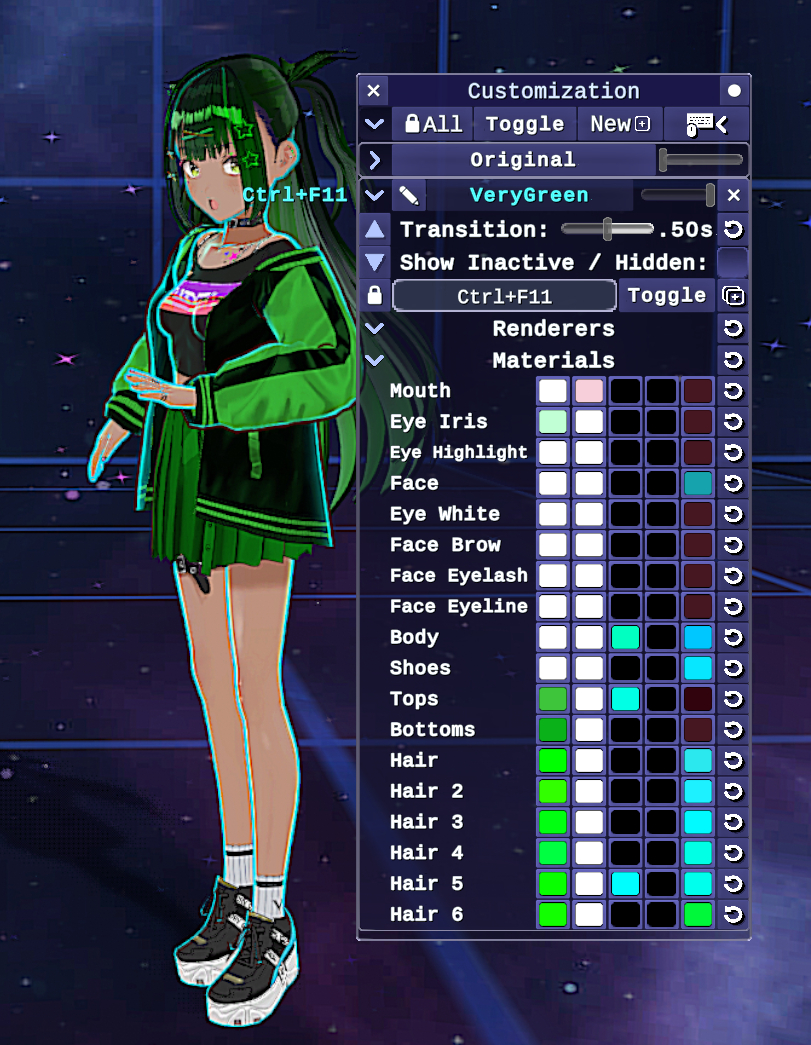
–New Customization Menu to alter your avatar after import, which currently includes color customization and most material properties (outlines, texture de-saturation/grayscale, lighting and shadows, etc.) Also enables toggling outfit parts (renderers) and will later include the ability to modify avatar proportions and hair/cloth physics. Note that the only limitation to this feature is if you are using shaders with locked properties on your VSFAvatar model, such as Poiyomi. Poiyomi shader properties that match those on VRM MToon shaders will need to be set to “Animate while locked” (or in 4.22 “Renamed while locked”) before exporting your model.
–Virtual Camera support so you can share you avatar with friends via Discord or while streaming together with using sites with https://vdo.ninja/ to send the video of avatar to each other.
-Completely re-optimized code that’s also been re-compiled into C++ via the IL2CPP compiler. This means the app now runs on native machine code, which can make math functions run significantly faster.
Other Additions:
Enabled Fast Spring Bone jobs for all model types, so models a lot of hair and cloth physics should run with significantly less performance overhead. With VSFAvatar models, outfit swaps that toggle VRMSpringBone components for performance will also toggle the corresponding FastSpringBone job.
-Hue Shift post processing effect with a customizable speed setting to shift colors over time (shown in the video above) Stickers will now attach to any part of the model, including hair!
-New sticker special effects: Pulse and Spin, with a new control to adjust the intensity of all effects simultaneously
-Stickers can now be hidden individually and dragged while hidden. Default binding is ‘H’ with new menu buttons for convenience
-The app now comes bundled with the OBS Spout2 plugin (and source code) to easily get video with background transparency working in OBS for streaming
-Loading of all avatar types, stickers, expressions, and customization data is now done asynchronously as to not pause the app while loading.
Fixes:
-Fixed External tracking (via OSC/VMC) being jittery that was introduced in 4.1
-Fixed position presents to have the avatar properly face the camera or turn towards their destination regardless if Avatar Strafe Movement is activated or not
-Fixed the Esc key not properly cancelling gamepad rebind prompts
-Fixed the Transition slider not showing up for VSFAvatar animations when expression Toggle/Hold/Auto modes are changed for the expression, so now the speed, duration, and transition for animations can be customized.
4/20/2026 Version 4.21 Bugfixes and a few additions!
Additions:
-Loading new images for stickers now supports all of these file formats in addition to the already supported PNG, JPG, and GIF: WEBP, PST, TGA, BMP, and ZLIB. Big thanks to netpyoung / unity.webp for the webp support and StbSharp / StbImageSharp for the all the rest!
Fixes:
-Fixed an issue that was causing face tracking from external apps (VSeeFace, etc.) to not work through the OSC/VMC receiver. Thanks to twitch.tv/karacorvis for finding this one and the next one too:
-Fixed the windows maximize button (in the upper right) from being used when Window Resizing was on but Lock Aspect Ratio was also on.
-Fixed a long standing issue of the avatar image sometimes not showing up on the Spout2 display when swapping between post process anti-aliasing modes.
-Fixed the Maximum Resolution cap from being applied when you manually maximize the window size. Maximum Resolution has been changed to “Max Scaled Resolution” and only applies when using resolution scaling above the current window size
-Fixed post processing effects not showing up in the main window (but showing up in Spout2, etc) when Post Process AA was set to FSR3 or DLSS.
-Fixed Color Picker controls (for selecting colors like for the virtual controllers buttons) not properly saving their colors on restart
5/2/2026 Version 4.22 – Hyper-Optimization and Big-Bugfixes
With this version, CPU and GPU usage of the app have been lowered significantly that my goal of optimizing it to the point of being on par with one of the most optimized VTuber apps, VSeeFace, has been achieved and even exceeded in some cases!
Optimizations:
-All aspects of the app have been optimized, from idle time, to input handling, face tracking, Spout2 and Virtual Camera, user interface and customization menu options, model loading, I went very deep into the cornfield to compile this, making sure that nothing is updating when it doesn’t need to, including built-in systems like Post Processing and the Unity Input System itself.
-Optimized the already optimized Fast Spring Bone system to run models with a lot of physics even faster than previously, and included improved logic to handle if physics were toggled on or off on the model via VSFAvatar expressions. VRMT will now reconstruct the fast spring bone buffer to maximize performance when a model springbone physics change is detected
-Optimized the rending pipeline even further, so that there are minimal barriers between the camera image reaching the screen, having post processing done, and reaching the Virtual Camera or Spout2 plugin displays, significantly reducing GPU%.
-Optimized post processing effects and upscaling to use significantly less GPU%, especially when using older Post Process antialiasing methods (FXAA, SMAA, or TAA). Post Processing effects will also show up with improved clarity in Spout2 as a render mask is no longer needed unless TAA or FSR3 are used to retain background transparency.
-There will no longer be a CPU performance spike when activating a customization preset for the first time, this was caused by the menu layout being updated too frequently on first activation and was fixed by throttling the layout updates.
Additions:
-Added keybindings to change the main menu tabs, with the default keys being the numbers key row with holding down shift to get to the next row
-Added a slider option to control the VR Stage startup effect or turn it off
-Added the ability to adjust Poiyomi shader colors and properties that have been set to “Renamed (when locked)” in addition to the already supported “Animated (when locked)” properties.
-Added higher accuracy when clicking on stickers to select or drag them, so if there are several on top of each other, you can click through transparent pixels to select stickers behind.
Fixes:
-Fixed a issue with eye tracking jitter when using 3D-Face Tracking that could happen if the frame rate of the tracking app differed from the framerate of VRMoveTime. For whatever reason this one was difficult to reproduce on my end, but I finally nailed down the source of the issue. One of the animators in the scene that’s used to blend animations together could override the tracking app eye gaze positions on the same frame, and the fix was just to use completely separate transforms to blend the eye gaze direction.)
-Fixed head tracking position lurching that was introduced in 4.20 if ‘Head Tracking Jitter Reduction’ was on. This was caused by an optimization that was occasionally producing outlier values.
-Fixed an issue where walking animations were not being properly blended with VSFAvatar human animations while moving.
-Fixed breathing animations overriding the hip position of the model, which made them look strange while walking. Also made sure that Arm Sway animations are disabled while moving our crouching because that looked pretty weird too.
-Made sure that calibration is performed instantly when activating tracking for the first time to avoid any head position lurches that could happen if your head was very close or far away from the camera.
-Fixed XBox controllers not respecting Virtual Controller app focus settings.
-Fixed an issue that could cause XBox controller Analog sticks to not work if the controller was connected after the app had already been started.