
特徴 ガイド
Here are the main feature tabs for the program, click on each for more detailed descriptions:

Avatars & Tracking
Loads in new VRM0, VRM1, or VSFAvatar model files, with enhanced support for VSFAvatar features. Enable 3D face tracking sent from iPhone or Android, or received from other VTuber apps via OSC link.

Scene Presets
Control the position of the avatar, camera, and virtual controllers using the menu, and create presets with hotkeys to restore those positions. The avatar will walk, run, or slide into the new position with the virtual controllers at the selected positions and angles.

Stage & Lighting
Control the color, size, and visibility, and lighting for the stage and avatar.

Props
Load in images or animations to place on the avatar or background, and control their visibility, size, and movement with customizable hotkeys.

Keyboard & Mouse
Fully customizable keybindings with toggles for global (background) input and support for F13-24 key mapping. Multiple options for controlling the avatar and camera, including standard Alt-key camera controls.

Gamepad Controls
Full controller support with customizable bindings and toggleable background input.

Virtual Controllers
Have your avatar hold a virtual controller and push all the same buttons you’re pushing, and display it directly on the screen too. The VCs have customizable colors, button particle effects, and keyboard/mouse to button translation support.

Interface Options
Change the language and size of all menus. Change the colors and customize all interface elements.

Sound
Control the volume of app sounds and included VSFAvatar sounds.

Display, Video & Post Processing Options
Change the resolution of the app window and OBS/Spout2 display separately, and apply upscaling through SMAA, FSR3, DLSS, etc. along with post processing effects such as Outline Enhancement.

Accessibility
Includes options to adjust the view for the major types of colorblindness.
Expressions Menu
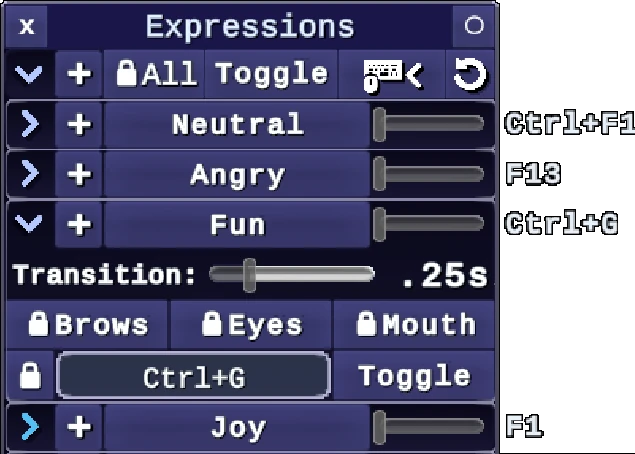
Automatic expression setup, including VSFAvatar features and animations with hotkeys